
Ledger Rental Guide: 7 Entries San Diego Hosts Must Track

A simple, dated ledger keeps every San Diego rental dollar traceable.
A ledger rental record, better known as a rental ledger, is a dated log of every dollar a property earns or spends, with a running balance after each entry. At West Coast Homestays, we manage 80+ properties across San Diego, and a clean ledger turns tax season into a short afternoon instead of a scramble.
Key Takeaways
A rental ledger records every payout, fee, refund, tax, and expense by property; a lease is the contract, and the ledger is the money trail.
The City of San Diego's STRO page says operators must keep records for each STRO transaction for four years and provide them on request.
Seven entries cover most San Diego hosts: gross payouts, platform fees and refunds, cleaning fees, TOT, Rental Unit Business Tax and permit fees, operating expenses, and capital assets.
Transient Occupancy Tax collected from guests is a liability in your ledger, not income.
The IRS generally reports rental income and expenses on Schedule E, Part I, and expects receipts, canceled checks, or bills to support deductions.
A monthly reconciliation against payout statements, bank deposits, invoices, and city tax filings keeps errors small.
Most hosts meet their ledger in February, when a pile of payout emails, cleaner invoices, and city tax notices has to become one coherent number. By then, a single Airbnb deposit may cover four reservations and net out two refunds, and nobody remembers which was which. A ledger kept as you go prevents that reconstruction work.
The stakes are concrete in 2026. AirDNA-referenced market data puts San Diego short-term-rental occupancy near 60%, with average daily rates between $331.10 and $333.70 and average annual revenue around $38,700 per property. Those averages only help if your own ledger shows where your unit sits against them.
This guide covers seven entries every San Diego host should record, how to build the ledger, what the City and the IRS expect, and where to find a free template. It draws on what we see when we audit new owner accounts at West Coast Homestays. If you want help beyond bookkeeping, our Airbnb management in San Diego page explains how we run the operation behind the numbers.
What Is a Rental Ledger, and Is a Ledger the Same as a Lease?
A rental ledger is a chronological record of financial transactions tied to a property, listing charges, payments, fees, deposits, and expenses with a running balance. A lease is a contract that sets occupancy terms. The lease states what a tenant agreed to; the ledger shows what moved through your accounts.
Short-term hosts rarely sign leases. The Airbnb, Vrbo, or Booking.com reservation plays that role, which makes your ledger the only document tying each booking to dollars. Three related records often get confused:
- What it tracks
- Tenant rent ledger: Rent charges, payments, late fees, and deposits for one tenancy
- Property-level ledger: All income and expenses for one property, including utilities, taxes, insurance, and fees
- Tax-ready income and expense report: Ledger totals sorted into the categories your return uses
- Tenant rent ledger: Long-term landlords
- Property-level ledger: Short-term and mid-term hosts
- Tax-ready income and expense report: Your CPA or tax software
San Diego hosts need the middle row. A tenant-style template built around monthly rent columns breaks the moment a payout bundles five stays and a refund.
Is a Rent Ledger Legally Required for San Diego Hosts?
Legal recordkeeping for a San Diego short-term rental means keeping transaction records that the City of San Diego and the IRS can ask to review. We cannot point to a rule that prescribes a specific ledger template. The duty to keep supporting records, however, is real.
The City of San Diego STRO page says operators must maintain information for each STRO transaction for four years and provide it on request. The IRS says good rental records help you identify income sources, track deductible expenses, and support items on your return.
The City's retention period and the IRS substantiation rules are separate obligations; one does not replace the other. Keep documents at least as long as the longest period that applies to you, and confirm timing with a tax professional.
Federal form selection also depends on your facts. Most rental income lands on Schedule E (Form 1040), Part I, but the services you provide and any personal use of the home can change the reporting. Ask a CPA about your situation before you file.
How Do I Make a Rental Ledger From Scratch?
Building a rental ledger means setting up one dated, categorized log per property that ties every entry to a supporting document. A spreadsheet works for a single unit. Follow these steps:
Create one ledger per property so a Pacific Beach condo never shares rows with a Carlsbad house.
Add columns for date, description, category, amount, and the supporting document.
Pick your accounting basis. The IRS says cash-basis taxpayers generally report income when received and deduct expenses when paid, while accrual-basis taxpayers use earned and incurred.
Enter every reservation at its gross amount, then log fees, refunds, and taxes on separate lines.
Save each receipt, invoice, and payout statement, and name the file by date and vendor.
Reconcile against your bank statement every month.
A sample set of entries for one reservation looks like this. The amounts are illustrative only, not market figures:
- Description
- Payout date: Guest payment, reservation code
- Payout date: Platform service fee
- Payout date: Cleaning fee collected
- Payout date: TOT collected
- Date paid: Cleaner invoice
- Payout date: Gross rental income
- Payout date: Expense
- Payout date: Income, cleaning
- Payout date: Liability
- Date paid: Expense, cleaning
- Payout date: $1,000.00 (example)
- Payout date: -$30.00 (example)
- Payout date: $150.00 (example)
- Payout date: $120.00 (example)
- Date paid: -$140.00 (example)
- Payout date: Platform payout report
- Payout date: Payout statement
- Payout date: Reservation detail
- Payout date: Reservation detail
- Date paid: Invoice

A modern living room featuring a vibrant blue sectional sofa with decorative throw pillows, a brown leather accent chair, and a round black coffee table on a neutral area rug. The space is filled with natural light from large windows overlooking greenery, complemented by contemporary décor including a brass floor lamp, potted plants, and textured green wallpaper.
1. Gross Guest Payments and Platform Payouts
Gross guest payments are the full amounts guests pay for stays before Airbnb, Vrbo, or Booking.com deduct their fees. Record each reservation as its own line at the gross figure, not as the lump sum that lands in your bank. One payout can bundle several stays, so the deposit rarely matches any single booking.
Timing matters too. The IRS says cash-basis taxpayers generally report rental income in the year received, so a stay ending December 30 with a payout on January 3 can fall into a different year than you expect. Confirm your accounting basis with a tax professional.
Tag every line by channel and by stay type, STR or MTR. A San Diego operator running a hybrid STR/MTR strategy reached $136,732 in annual revenue at 83.29% occupancy, against a $98,800 STR-only projection. Tagging by stay type is what lets you run that comparison in your own books.
Give each property its own ledger. A La Jolla oceanview condo and a Mission Beach boardwalk cottage compete in different comp sets, and blended books hide which one is carrying the portfolio.
2. Platform Fees, Refunds, and Pricing Adjustments
Platform fees are the service charges Airbnb, Vrbo, and Booking.com deduct from each payout, and they belong in your ledger as expenses rather than as reductions of income. Netting them out hides your true gross and makes your average daily rate look lower than what guests paid. Refunds and resolution adjustments get negative entries linked to the original reservation code.
Your ledger is also where pricing mistakes show up first. A 2026 study of 541 Airbnb listings in 34 countries, reported by Your.Rentals and PriceLabs, found dynamic pricing lifted gross revenue per unit by an average of 36.3%.
Miscalibrated pricing cuts the other way. From what we see at West Coast Homestays, a pricing error can cost $30,000 to $40,000 in a single month. A weekly ADR column in your ledger flags that drift in days instead of at year-end, which is the same discipline behind our revenue management and dynamic pricing work.
3. Cleaning Fees Collected and Cleaning Costs Paid
Cleaning fees are charges collected from guests to cover turnover costs, and they need two ledger lines: the fee collected as income and the cleaner's invoice as an expense. Collapsing them into one net number hides whether your fee covers what you pay.
Compare the two columns monthly. Pacific Beach summer weekends often stack same-day turnovers; if your cleaner charges more for rush work, only separate lines will show it.
Cleaning fee optimization has produced $6,600 a year in added profit for West Coast Homestays clients, and that kind of gain only appears when the fee and the cost sit side by side.
Add a third line for early check-in and late checkout upsells. In our portfolio, those fees can generate $5,500 to $6,500 a year. Buried inside nightly revenue, they disappear from view.
4. Transient Occupancy Tax Collected and Remitted
Transient Occupancy Tax, or TOT, is a tax collected from guests on stays shorter than one month and remitted to the taxing authority, so it is a liability in your ledger and not income. The City's Rental Tax Frequently Asked Questions says hosts of transient rentals must collect and remit TOT and obtain a Transient Occupancy Registration Certificate.
Create a separate liability line. Tax collected raises the balance, and each filing lowers it. If the balance fails to reach zero after a filing, you have a reconciliation problem to fix before the next quarter.
The San Diego County Treasurer-Tax Collector's Transient Occupancy Tax host compliance portal states that reporting is quarterly. Confirm your own schedule there.
Jurisdiction matters. If your unit sits in Carlsbad, local rules may differ from a City of San Diego property. The same caution applies in Encinitas. Owners in Oceanside should check which agency collects TOT for their address before the first filing.
5. Rental Unit Business Tax and STRO Permit Fees
Rental Unit Business Tax, or RUBT, is an annual, calendar-year tax the City of San Diego assesses on people who own, operate, or manage residential rental real estate. The City's exemption form states that a short-term rental is not exempt, and that property rented or advertised for more than six days in a calendar year is liable.
Log RUBT payments, STRO license fees, and renewals as separate expense lines, each with a date and account number. Fee amounts change, so copy them from the official notice instead of from memory.
Keep your TOT certificate number and RUBT account details in the same folder as the ledger. The City's STRO page expects you to produce transaction records on request, and a single folder makes that request painless. For the wider rulebook, our short-term rental laws posts track ordinance changes.
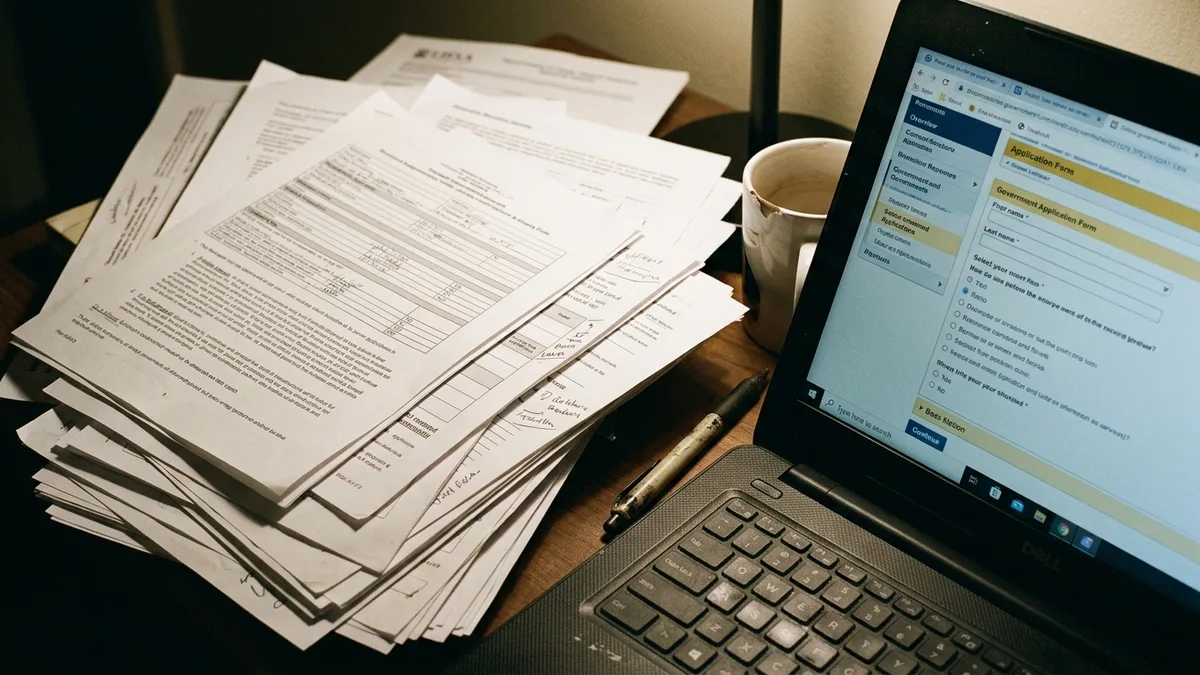
A close-up of a property owner's hands sorting printed tax documents and a laptop showing an online government permit application form
6. Operating Expenses, Repairs, and Management Fees
Operating expenses are the ordinary and necessary costs of running a rental: utilities, insurance, property taxes, supplies, software, repairs, and management fees. The IRS says substantiating deductions generally requires documentary evidence like receipts, canceled checks, or bills, so attach one to every line.
Keep mortgage interest in its own financing category. TenantCloud's accounting guide treats it separately from operating costs, and that separation keeps your net operating income clean when you compare properties. Record management fees on their own line as well. Fees vary by property, so confirm yours in writing; our San Diego property management cost guide explains how to read a fee statement.
Coastal properties generate steady small repairs, since salt air is hard on exterior hardware and appliances. A Mission Beach cottage a few steps from the sand will chew through patio latches and outdoor fixtures faster than an inland condo. West Coast Homestays coordinates maintenance so these items get a dated invoice instead of a vague cash payment. Use Publication 527, Residential Rental Property to separate repairs from improvements.
7. Capital Improvements, Furnishings, and Depreciation Assets
Capital improvements are purchases that add lasting value or last beyond one year, such as furniture packages, appliances, flooring, or a new roof. You generally recover them through depreciation instead of deducting them all at once. The IRS points to the Instructions for Form 4562 for calculating depreciation that carries to Schedule E.
For each asset, record the description, purchase date, date placed in service, cost, vendor, and receipt. A furnishing and staging package for a new La Jolla or Pacific Beach listing is a good example: one invoice covers many items, so ask your CPA how to classify them. We recommend requesting itemized invoices from any designer or vendor.
Keep these purchases out of your operating expense lines. Mixing a $4,000 sofa order with a $90 plumbing call distorts every monthly comparison you run.

A stunning twilight view of a modern two-story beachfront home featuring a spacious patio with purple flowering plants, outdoor dining furniture, and a blue umbrella, with illuminated windows and balconies showcasing contemporary architecture against a dramatic pink and blue sunset sky.
How Do You Reconcile a Month-End Ledger Against Payouts and Filings?
Month-end reconciliation is the routine of matching every ledger entry to an outside document, such as a payout statement, bank deposit, invoice, or city tax filing. Without it, small errors compound into a year-end puzzle. Work through this checklist:
Match each Airbnb, Vrbo, and Booking.com payout statement to a bank deposit.
Confirm each reservation appears at its gross amount with fees and refunds on separate lines.
Tie cleaner and vendor invoices to the correct property and month.
Check that TOT collected this month equals the liability you will remit.
Confirm any RUBT or STRO payments carry a dated receipt.
File documents and note unresolved differences for next month.
Thirty minutes at month-end beats a weekend in March. Owners who run several units can rotate the same checklist across properties on set days.
Where Can I Find a Free Rent Ledger Form?
A free rent ledger form is a pre-built spreadsheet or printable template with columns for dates, descriptions, charges, payments, and balances. Any spreadsheet application can host one. Search for a property-level income and expense template, since tenant-only forms assume one monthly payment.
Modify the template before you rely on it. Add columns for gross amount, platform fee, cleaning fee, TOT, and channel. Skip the printed landlord record books sold as gifts; they have no room for payout reconciliation.
Software such as QuickBooks, Stessa, and TenantCloud automates parts of this work. Pricing and free tiers change, so check each vendor's current plans. Our real estate accounting posts cover tools in more depth.
Frequently Asked Questions
How do I analyze or value a short-term rental using my ledger?
Start with net operating income: total rental revenue minus operating expenses, leaving out financing costs like mortgage interest. Then compare your ledger's occupancy and ADR against market data such as AirDNA's. A property whose ledger shows steady gross income but rising expenses may be worth less than its revenue suggests.
How do I maximize short-term rental income with ledger data?
Your ledger shows where income leaks. Review ADR by week to catch pricing drift, compare cleaning fees against cleaner invoices, and track upsells such as early check-in separately. Dynamic pricing can lift revenue, but you need clean records to confirm it is working.
What do I need before listing a property as a vacation rental in San Diego?
Plan on a Transient Occupancy Registration Certificate, a Rental Unit Business Tax account, and an STRO license if your property falls under the ordinance. Requirements depend on your jurisdiction and property, so verify them on the City of San Diego's official pages. Open your ledger before the first booking.
How long should I keep rental ledger records?
Keep them at least as long as the longest rule that applies to you. The City's STRO retention requirement and IRS substantiation expectations are separate, so one does not replace the other. Store digital copies of receipts and payout statements, and ask a tax professional about your timeline.
Should I record TOT as income?
No. Tax collected from guests is a liability until you remit it. Record it on its own line, reduce the balance with each filing, and keep it out of your gross rental income. Confirm your filing schedule on the official TOT portal.
Who can handle management and ledger-ready records for a San Diego Airbnb?
West Coast Homestays manages short-term and mid-term rentals across San Diego coastal neighborhoods, with 80+ properties under management. We handle pricing, guest communication, cleaning, and maintenance. Compare any manager on reporting transparency, owner statements, and how it separates fees, taxes, and expenses. Fees vary by property, so confirm them directly.
Conclusion: Start Your Ledger Rental System Before the Next Payout
A ledger rental system comes down to one habit: record every dollar at its gross amount, keep taxes and expenses on their own lines, and reconcile monthly against outside documents. Owners who do this know their numbers and file without panic. Owners who skip it rebuild a year of payouts from email.
Looking ahead through 2026, expect cities and tax authorities to keep asking for transaction-level records, so build the ledger now.

a property manager reviewing a colorful revenue calendar on a laptop screen showing peak and
If your books already feel unmanageable, West Coast Homestays can walk through your specific numbers and show where the revenue gaps sit. With 80+ properties under management and $121K+ in revenue increases from dynamic pricing and listing optimization, our team builds the listing, pricing, and turnover records that make a clean ledger possible. Book a call to review your property.
Content powered by inkSTR.co


